When I first started organizing opening sizes, I thought it was just a matter of adding and subtracting dimensions. If a drawing showed 12×12, I assumed the opening would simply be 12×12. As long as the duct or grille could pass through, it seemed straightforward enough.
But once I started doing actual field coordination, I realized it was not that simple at all.
Even when the drawing shows the same 12×12 size, the actual opening required can still vary. Some products use the listed size directly, while others show an actual neck size of 12-1/4 in the submittal. In some cases, drywall needs to be included. In other cases, an RFI response may confirm that drywall return is not required. And even when the opening itself is correct, the flange can still create conflicts with the ceiling finish or wall finish.
The more I worked through these situations, the more I realized that the hard part was not just the math. The hard part was the judgment behind the math.
In the end, the final opening is built from a series of decisions:
- whether to follow the nominal size shown on the plan
- whether to follow the actual opening shown in the submittal
- whether drywall return should be included
- whether wall rating requires additional layers
- whether the calculated number should be cleaned up into a more field-friendly dimension
- whether the flange will interfere with the finished condition
Because of that, I do not really think of this as just an opening calculation sheet. To me, it is closer to a sheet that explains why an opening ended up with a certain size.
That is why I stopped sizing openings by instinct. Instead, I built an Excel sheet that lets me track not only the final number, but also the reasoning behind it.
This is a record of how I organize my Excel sheet when coordinating grilles, registers, diffusers, wall openings, and framed rough openings. It is not meant to replace drawings, submittals, RFIs, or field verification. It is simply a coordination tool that helps me document the decision-making process more clearly in the field.
The Excel Columns I Use
These are the basic columns I use:
- Floor
- Room Number
- Tag
- Model
- Plan Size
- Opening Basis
- Required Opening
- Wall Type / Rating
- Drywall Required
- Drywall Each
- Calculated Opening
- Final Opening
- Flange Each Side
- Total Flange Size
- Notes
- Verified With
1. Floor / Room Number / Tag
These columns are for tracking location.
An opening is never just a number by itself. What matters is which floor it is on, where it is located, and which tag it belongs to. Later, when I compare it to the drawing, check the field condition, or talk to the framer, I need that basic information to know exactly which opening I am dealing with.
The more repeated grille types there are, the less useful size alone becomes. That is why I always include Floor, Room Number, and Tag.
When I first made this spreadsheet, it was for a hotel project, so room number made sense. Depending on the type of project, though, that part can be adjusted more flexibly.
2. Model
This is where I record the grille model name.
I include this because the nominal size shown on the drawing does not always match the actual opening required by the product. For example, the drawing may show 12×12, but the submittal may say the neck size is Listed Size – 1/4 or Listed Size + 1/4.
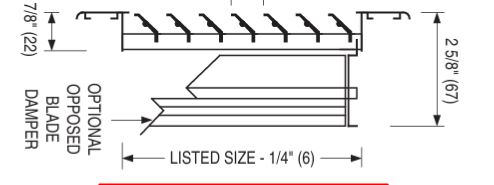
If it says Listed Size – 1/4, that may mean that even though the drawing shows 12×12, the actual grille neck or opening related dimension is closer to 11-3/4. On the other hand, if it says Listed Size + 1/4, that means the actual product opening basis is larger than the nominal size shown on the drawing.
So even when two grilles have the same plan size, the actual opening basis may still be different depending on the product. That is why the Model column is not just a reference. It helps explain why the opening value changes even when the plan size looks the same.
3. Plan Size
This is simply the size shown on the drawing.
If the plan shows a 12×12 grille, then I enter 12×12 here. The important point is that this is only the drawing size. It does not automatically mean that the actual opening will be the same.
I keep this column because I want to preserve the original design reference before any adjustments are made for the submittal, drywall condition, or field coordination.
4. Opening Basis
This is one of the most important columns in the sheet.
Put simply, this column records what the opening number is based on. It tells me where the opening value came from.
If I only write down the number, I may not remember later whether it came from the drawing, the submittal, an RFI, or a field condition. By recording the Opening Basis, the starting point of the calculation stays clear.
For example:
Example 1 – Using the drawing size directly
If the drawing shows a 12×12 grille and the submittal also shows nominal 12×12 / neck 12×12:
Opening Basis: Plan / Nominal Size
Example 2 – Using the submittal actual opening
If the drawing shows 12×12, but the submittal neck size is 12-1/4 x 12-1/4:
Opening Basis: Submittal Actual Opening
Example 3 – Drywall return excluded by RFI
If I originally planned to include drywall return, but the RFI response confirms it is not required:
Opening Basis: Per RFI / No Drywall Return
Example 4 – Adjusted because of field condition
If the size was adjusted because of framing conditions in the field:
Opening Basis: Field Adjusted
So Opening Basis is not the formula itself. It is the note that explains where the calculation begins.
5. Required Opening
This is the opening dimension that becomes the actual starting point for the calculation.
If Plan Size is the drawing reference, then Required Opening is the opening value I am actually going to use for coordination. In some cases, it is the same as Plan Size. In other cases, it needs to follow the actual submittal opening or the manufacturer’s stated opening dimension.
For example, if the submittal says Listed Size + 1/4 and the plan size is 10×10, then the base opening becomes:
10-1/4 x 10-1/4
That is why I separate these two columns:
- Plan Size = the size shown on the drawing
- Required Opening = the opening size actually used for coordination
6. Wall Type / Rating
This column is less about direct calculation and more about documenting the judgment behind it.
For example, I may note whether the opening is in a:
- non-rated wall
- 1-hour rated wall
- 2-hour rated wall
- shaft wall
This helps when deciding how drywall should be handled. Especially in a 2-hour rated wall, the wall rating can become an important factor in determining the drywall layer buildup.
7. Drywall Required / Drywall Each
These two columns need to be read together.
Drywall Required records whether drywall return or drywall wrap should be considered inside the opening. Drywall Each records the drywall thickness on each side.
For example:
- 1 layer = 5/8 inch
- 2 layers = 1-1/4 inch
One important thing is that the drywall decision is not always the same even when the wall type is the same. Two openings in non-rated walls may still be handled differently. One may include drywall return, while the other may not.
That happens because field conditions vary. Framers may wrap an opening conservatively in one location, skip it in another, or an RFI may confirm that drywall return is not required.
That is why Wall Type / Rating alone is not always enough. Drywall Required deserves its own column, because one column describes the wall condition, while the other describes how the opening is actually being handled.
Also, although 5/8 inch is often treated as a default drywall thickness, it is still important to confirm the actual drywall assembly with the framer or the drawings before moving forward.
8. Calculated Opening
This is the raw value produced by the math.
For example, if the Required Opening is 12×12 and I need to add 5/8 inch drywall on both sides, the total added thickness becomes 1-1/4 inch, so the calculated opening becomes:
12×12 + 1-1/4 = 13-1/4 x 13-1/4
I keep this value separately because I do not want to lose the original calculated number, even if I later change it into a more field-friendly dimension.
9. Final Opening
This is the final value I actually want to use in the field or for framing coordination.
In practice, calculated numbers such as 13-1/4 x 13-1/4 or 13-3/4 x 13-3/4 are sometimes inconvenient to communicate directly. So when the calculated value lands on an awkward fraction, I clean it up into a dimension that is easier to use in the field.
For example:
- If the Calculated Opening is 13-1/4 x 13-1/4, I may use 13-1/2 x 13-1/2
- If the Calculated Opening is 13-3/4 x 13-3/4, I may use 14×14
Within a reasonable range, I generally think it is better to be slightly looser than too tight. It is easier for the framer to work with, and it is also cleaner to communicate.
10. Flange Each Side / Total Flange Size
These two columns are more important than they first seem.
Getting the opening right does not automatically mean the job is done. Once the grille is installed, the flange extends beyond the opening. That flange can interfere with the ceiling grid, wall finish, or nearby edge conditions.
So I break it down into two parts:
Flange Each Side
How much the flange extends beyond the opening on each side
Total Flange Size
The full outer dimension of the grille including the flange
Looking at both values helps me catch finish conflicts before they show up in the field.
11. Notes
The Notes column is useful for anything that does not fit neatly into the other columns.
Examples include:
- Per RFI, no drywall return required
- Framing contractor to confirm field condition
- Rounded for framing convenience
- Check flange clearance at ceiling grid
- Rated wall condition to be verified in field
If I only keep the numbers, I may forget why I made a certain decision later. A short note helps preserve that context.
12. Verified With
This column records who or what I checked the value against.
For example:
- Submittal
- RFI
- Framer
- Foreman
- Field Verified
- PM Review
This is not for assigning blame. It is for recording the coordination source. In other words, it shows that the number was checked against an actual reference, not just guessed.
 Ocean HVAC Lab
Leave a comment